
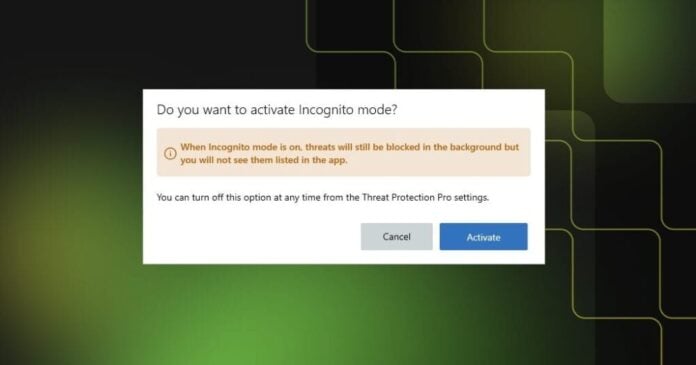
IPVanish has quietly added a feature that privacy-focused users have been asking for. The company announced Incognito Mode for Threat Protection Pro, now available on Windows and Mac. It lets users keep the VPN’s security tools active without building up a visible record of threats and activity inside the app.
The timing makes sense. More people share computers at home or in co-working spaces, and not everyone wants a full log of their browsing-adjacent security activity sitting in an app that others might open. Incognito Mode addresses that directly, without asking users to trade protection for privacy.
This matters because most security tools operate on the assumption that more logging equals better security. IPVanish is pushing back on that idea, at least at the local display level. The protection itself does not change when you flip the switch.
When Incognito Mode is on, Threat Protection Pro keeps doing its job in full. That means:
- Blocking malicious websites
- Stopping harmful downloads
- Detecting and blocking network attacks
- Quarantining malicious files
- Honoring your existing Allow List settings
What changes is purely what gets shown inside the app. The Activity and Threat tabs switch to a dedicated Incognito view, and new events stop being added to the local history. No new records appear while the mode is active.
One thing IPVanish was careful to preserve: critical alerts. Even in Incognito Mode, you still get notifications for network attack detections and file quarantine actions. The idea is that you should always know when something serious happens, even if you do not want a full log sitting there.
Your existing history is also safe. Turning on Incognito Mode does not wipe anything that was already recorded. If you later turn it off, all your previous threat and activity records come back into view exactly as they were. Nothing is deleted, just hidden from new additions while the mode runs.
This is a small but meaningful distinction. Some users might assume “incognito” means “delete everything”, but IPVanish is treating it more like a pause on new local logging rather than a reset button. That keeps things flexible and avoids any accidental loss of security records you might actually want.
Getting it set up takes about four steps:
- Open IPVanish on Windows or Mac
- Go to Threat Protection Pro Settings
- Find the Incognito Mode toggle
- Enable it and confirm
The feature is available now in the latest version of the IPVanish app. If you are already running Threat Protection Pro and have not updated recently, a quick update is all it takes to get access.
For a VPN provider, adding local privacy controls on top of network-level protection is a logical next step. Users increasingly expect tools that respect privacy at every layer, not just the connection level. Incognito Mode is a practical answer to that expectation, and it does not require giving anything up to use it.